
n8n Matters. Check out this beginners friendly guide.
If you’re learning web development, you’ve probably wondered how everything actually fits together.

You build a frontend.
Users click buttons and submit forms.
But then:
- Where does the data go?
- Who handles the logic?
- What decides what happens next?
Most beginners don’t get stuck because they can’t learn backend, but because the stack feels overwhelming all at once.
n8n helps simplify that transition by sitting neatly between your frontend and all the backend logic, APIs, and services you want to connect.
If you’re completely new to it, you can also read:
- What n8n is and how it works:
What Is n8n? - Why many web developers learn n8n early:
Why Web Developers Should Learn n8n Early - A simple explanation without backend jargon:
n8n Explained in Simple Terms
This guide focuses on one question: Where does n8n fit in the bigger picture of a web development stack?
What People Mean by a “Web Development Stack”
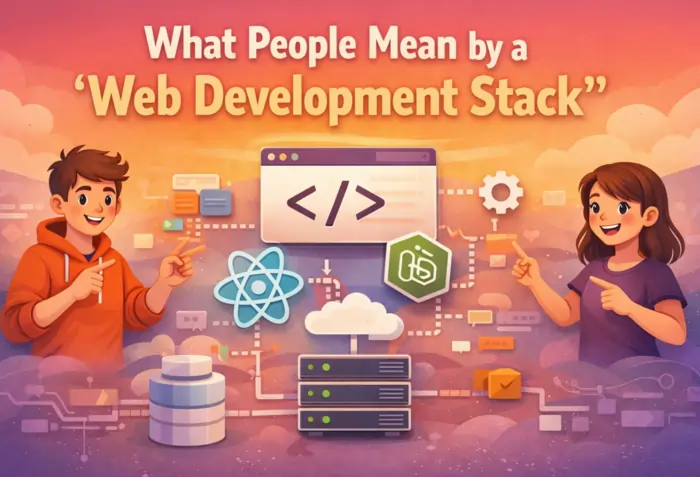
A web development stack is just the collection of tools that work together to make a website or app function.
At a basic level, that usually includes:
- Frontend – what users see and interact with (HTML, CSS, JavaScript, frameworks)
- Backend – the logic, rules, and data handling
- Database – where information is stored
- APIs – how your app talks to other systems
Traditionally, backend work involves:
- Setting up servers or serverless functions
- Picking and configuring a backend framework
- Managing deployment and environments
- Handling authentication and security
- Connecting to databases and external APIs
That’s a lot to absorb when you’re still getting comfortable with JavaScript.
The Traditional Setup (Why Beginners Feel Overwhelmed)
A typical “classic” stack looks roughly like this:
Frontend
⬇
Backend framework (Node/Express, Django, Laravel, etc.)
⬇
Server & hosting (VPS, PaaS, Docker)
⬇
Database
⬇
External APIs and services
For beginners, this often means:
- Multiple tools and languages to learn at the same time
- Many potential failure points (server, code, DB, DNS, hosting)
- Slow feedback when something breaks, because logs live on a server somewhere
It’s common to spend days or weeks just setting things up before seeing a single feature work end‑to‑end.
How n8n Changes the Flow
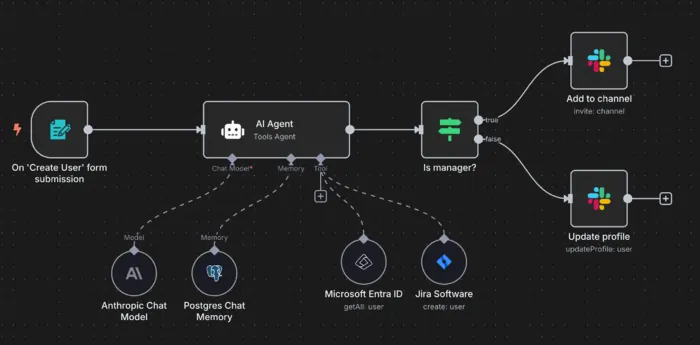
With n8n, backend logic becomes a visible layer instead of hidden infrastructure.
A simplified flow looks more like this:
Frontend
⬇
n8n (logic & automation)
⬇
Services, APIs, databases
Instead of writing and deploying backend code just to handle basic logic, you:
- Define workflows visually
- Let n8n handle HTTP requests, triggers, and orchestration
- Plug into databases, APIs, and services as needed
You’re still making decisions and controlling data.
You’re just not fighting infrastructure on day one.
Guides such as n8n: A Guide With Practical Examples and the official n8n Level One coursedescribe this exactly as using n8n as a glue layer between your frontend and the rest of your stack.
Real Places Where n8n Fits
1. Handling Form Submissions
A very common beginner problem:
“I built a form — now what?”
With n8n:
- Your frontend form sends data to a Webhook URL.
- n8n receives that data as a trigger.
- You decide—visually—what happens next.
That can include:
- Saving data to Google Sheets, Airtable, or a real database
- Sending you an email notification
- Posting a message to Slack or Discord
You get a working “frontend → backend → notification” flow without spinning up a backend server. The official Webhook and Google Sheets example demonstrates exactly this kind of pattern.
2. Connecting Multiple Tools
Modern web projects often use multiple external services:
- CRMs
- Email platforms
- Analytics tools
- Payment processors
- Databases and spreadsheets
n8n acts as the orchestrator:
- One node calls an external API
- Another node saves or transforms data
- Another sends notifications or triggers follow‑up actions
You see the entire flow on a canvas—no guessing what happens in some distant backend file.
Beginner‑friendly tutorials like Beginner’s Guide to n8n: Easy Workflow Automation show how to use n8n as the “control center” for all these services.
3. Working With Databases and Storage
n8n doesn’t replace databases—it connects to them.
You can use nodes for:
- PostgreSQL
- MySQL
- MongoDB
- Airtable
- Google Sheets
This lets you:
- Accept data from the frontend
- Process it in n8n
- Store it in a proper database or spreadsheet
You’re building real data‑driven features, while still clearly seeing how information moves from frontend to storage and back.
n8n Compared to a Traditional Backend
Here’s a simple comparison you can use as a mental model:
| Area | Traditional Backend | n8n |
|---|---|---|
| Server setup | Required | Optional / abstracted |
| Logic | Written in code | Visual workflows (nodes & flows) |
| API integrations | Written manually | Node‑based, prebuilt connectors |
| Learning curve | Steep for beginners | Designed to be beginner‑friendly |
| Real‑world use | Yes (production apps) | Yes (automation, orchestration) |
n8n doesn’t replace backend development.
It makes backend concepts easier to understand early on, so later frameworks feel like a natural next step instead of a completely foreign world.
Why This Approach Works So Well for Beginners
Learning backend through n8n works because it changes how you learn:
- You see data move step by step.
- You understand cause and effect: trigger → logic → action.
- You focus on logic first, instead of wrestling with configuration and deployment.
- You get results quickly, which keeps your motivation high.
That early feedback loop builds confidence. When you eventually learn Node, Express, or other backend frameworks, you’re mapping code onto concepts you already understand.
A Practical Learning Path With n8n
Many self‑taught and junior developers naturally follow a path like this:
- Learn HTML, CSS, and JavaScript for the frontend.
- Use n8n to handle backend logic for small projects (forms, notifications, integrations).
- Start connecting APIs and external services through workflows.
- Build more complex automations and data flows.
- Move into backend code (Node, Python, frameworks) once the concepts feel familiar.
By the time you reach step 5, backend development feels like an extension of what you already know—not a completely new, scary thing.
Bringing It All Together
n8n doesn’t remove backend thinking from web development.
It keeps the thinking, but:
- Makes it visible
- Makes it approachable
- Lets you learn it at a sane pace
You still learn about triggers, data flow, APIs, and storage—you just learn them through a visual tool first, instead of dropping straight into servers and framework configs.
If you want to see how n8n fits into a full learning journey for frontend developers, everything is connected inside this guide:
Final Thought
n8n isn’t a shortcut that lets you skip backend forever.
It’s a bridge.
A bridge between the frontend skills you already have and the backend understanding you want—built for developers who want to keep moving forward without getting stuck in setup hell.

