
Meta Ads Manager for beginners is the foundation of running profitable ads inside the advertising ecosystem of Meta Platforms. If you want to grow a business using Facebook and Instagram ads, you must understand this dashboard beyond the surface level. Many beginners feel overwhelmed when they first open Ads Manager. Too many buttons. Too many metrics. Too many options.
This guide will simplify everything—while also showing you how professionals at Social Baddie think inside the platform. If you are serious about growth in 2026, you must stop treating the dashboard as a “spending tool” and start treating it as a “data infrastructure.” This is exactly what we teach inside The Growth Lab, where structure meets strategy.
Entity Overview: Understanding the 2026 Meta Advertising Ecosystem
Before diving into Meta Ads Manager for beginners, you must understand the infrastructure. In 2026, Meta is no longer just a social media company; it is an AI-driven delivery engine. The transition from “manual targeting” to “algorithmic discovery” means your setup must be technically flawless.
| Entity | Description | Role in Advertising |
| Meta Ads Manager | The primary dashboard | Where campaigns are built, managed, and analyzed. |
| Meta Business Suite | The management layer | Handles organic posts, messaging, and basic insights. |
| Meta Business Portfolio | The structural vault | Manages Pixels, Domains, and Business Settings. |
| Meta Pixel & CAPI | The signal layer | Tracks user actions via Conversions API integration. |
What Is Meta Ads Manager for Beginners?
Meta Ads Manager is a web-based tool that allows advertisers to create, manage, analyze, and scale paid advertising campaigns across Facebook, Instagram, Messenger, and Audience Network. For beginners, think of it as your advertising control room. Unlike “Boosting Posts,” which is a simplified shortcut designed for engagement, Ads Manager provides the granular control necessary for high-level ROI.
Why Beginners Must Graduate from “Boost Post”
The “Boost Post” button is essentially a “lite” version of the auction. It optimizes for likes, comments, and shares. While this is great for social proof, it is notoriously inefficient for sales. Meta Ads Manager for beginners opens up the full power of the Meta algorithm, including:
- Custom Conversions: Telling Meta exactly which button click constitutes a “Sale.”
- Retargeting: Showing ads specifically to people who visited your site but didn’t buy.
- A/B Testing: Scientifically proving which image or headline performs better using Meta’s Experiments tool.
Check out our full archive of PPC Lab Notes to see how this fits into a broader multi-channel strategy.
The 2026 “Lattice” AI: Why Targeting Has Changed
In 2026, Meta uses the Lattice Architecture. This is a massive multi-task learning model that predicts user behavior with 80% higher accuracy than the models of 2022.
For the user of Meta Ads Manager for beginners, this means:
- The Creative IS the Targeting: The AI “reads” your video hooks and image text to find your audience.
- Broad is Better: Narrow interest targeting (e.g., “People who like Yoga”) often performs worse than broad targeting because it limits the AI’s ability to find hidden buyers.
- Signal Health is King: If your Pixel and CAPI are sending “dirty” or “duplicate” data, the Lattice AI will make bad predictions, leading to high CPAs.
Understanding the 3-Level Campaign Structure in 2026
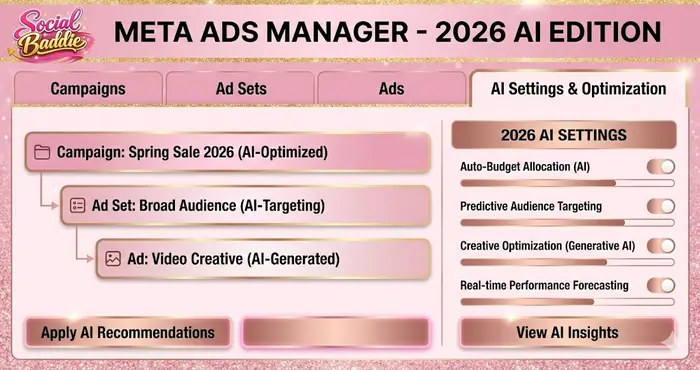
Meta Ads Manager for beginners becomes intuitive once you master the three-tier hierarchy. Every ad you see on Facebook exists within this structure.
1. Campaign Level: The Objective
The campaign level defines your ultimate goal. In 2026, Meta has simplified these into six primary Campaign Objectives:
- Sales: For e-commerce and direct response.
- Leads: For service businesses and data collection.
- Engagement: For video views and messages.
- Traffic: For sending people to a link (high volume, low quality).
- Awareness: For brand reach and impressions.
- App Promotion: For mobile application installs.
2. Ad Set Level: The Strategy
This is where the “where, when, and who” happens.
- Audience: Choosing your demographics, interests, or Custom Audiences.
- Placements: Deciding if your ad appears on Instagram Stories, Facebook Feed, or Reels using Advantage+ Placements.
- Budget & Schedule: Setting your daily or lifetime spend.
3. Ad Level: The Creative
This is the “What.” It is the actual image, video, and text the user interacts with. This is the single most important lever in Meta Ads Manager for beginners today.
The 2026 “Social Baddie” Professional Optimization Framework
To reach a professional level, you need a routine. At Social Baddie, we follow a specific framework to ensure we are never making “emotional” decisions.
Phase 1: The Creative Sandbox (Scientific Testing)
In this phase, you are not looking for profit; you are looking for Winning Assets.
- Structure: 1 Campaign (Engagement or Sales), 3-5 Ad Sets.
- The “Dynamic Creative” Method: Use Meta’s tools to test multiple components via Advantage+ Creative simultaneously.
- The 3:2:2 Method: 3 Creatives, 2 Headlines, 2 Primary Texts. Let Meta find the winning combination.
Phase 2: Advantage+ Shopping Campaigns (The 2026 Power Move)
Once you find a winning creative in your Sandbox, you move it to an Advantage+ Shopping Campaign (ASC).
- What is ASC? It is Meta’s most advanced AI-driven campaign type. It bypasses manual audience selection and finds buyers based on historical Pixel data.
- Why it works for beginners: It removes the technical debt of audience building.
Phase 3: Scaling Responsibly
Scaling is where most Meta Ads Manager for beginners users fail. They see a good day and double the budget.
- The 20% Rule: Never increase your budget by more than 20% every 48–72 hours.
- Why? Rapid budget changes reset the Learning Phase, causing performance to fluctuate wildly.
The Learning Phase: The Silent Killer of Beginner Success
When you launch a new ad, Meta enters the Learning Phase. This is a period of “discovery” where the algorithm is testing different pockets of users to see who responds best.
- The Requirement: Meta needs roughly 50 optimization events (e.g., 50 sales or 50 leads) per week to stabilize.
- The Solution: Be patient. Give an ad at least 7 days before deciding if it is a failure. You can track this in your Account Quality dashboard.
What is “Learning Limited”?
If your budget is too low or your audience is too narrow, you will hit “Learning Limited.” This means Meta’s AI has given up on trying to optimize because there isn’t enough data. To fix this:
- Increase Budget: Give the AI more “fuel.”
- Combine Ad Sets: Stop splitting your budget across 10 small ad sets.
- Change Objective: If you can’t get 50 Sales, try optimizing for “Add to Cart” to give the AI more data points.
Masterclass: Tracking and Attribution in 2026
You cannot optimize what you cannot measure. In Meta Ads Manager for beginners, the “Standard” pixel is no longer sufficient due to privacy regulations and browser blocks.
The Conversion API (CAPI) Deep Dive
CAPI sends data directly from your server to Meta, bypassing the browser.
- Deduplication: Ensuring Meta doesn’t count the same sale twice.
- Match Quality Score: A score out of 10 that tells you how much data Meta can match to a real user. Aim for an 8.0 or higher.
- Event Match Quality: If your score is low, you are wasting 30-40% of your budget on “blind” advertising.
Key Metrics for Meta Ads Manager for Beginners: What Actually Matters?
The dashboard shows dozens of numbers. You must focus on the “Core Four”:
- ROAS (Return on Ad Spend): Your ultimate profitability health check.
- CPA (Cost Per Acquisition): How much does it cost to get one customer?
- CTR (Click-Through Rate): This tells you if your creative is interesting.
- CPM (Cost Per 1,000 Impressions): This tells you how expensive your audience is. Monitor these in Ads Manager Reporting.
Advanced Metrics for Lab Analysts
- Thumbstop Ratio: (3-Second Video Views / Impressions). This tells you if your video “Hook” is working. Target: 25%+.
- Hold Rate: (ThruPlays / 3-Second Views). This tells you if your video is actually interesting. Target: 15%+.
- Conversion Rate (CVR): (Purchases / Clicks). This tells you if your website is doing its job. Target: 2-3% for E-com.
Diagnosing Underperforming Ads: The “Doctor” Framework
If your ads aren’t working, use this diagnostic tree:
- Problem: High CPM ($40+).
- Diagnosis: Your audience is too narrow or your creative is flagged as “Low Quality.”
- Fix: Go broader or change your creative hook to be more “socially acceptable.”
- Problem: High CTR (2%+) but NO Sales.
- Diagnosis: The ad is great, but the landing page is broken, slow, or the offer is bad.
- Fix: Check mobile load speed and ensure the “Offer” on the ad matches the “Offer” on the page.
- Problem: Low CTR (Below 0.5%).
- Diagnosis: The audience doesn’t care. The creative is boring.
- Fix: New creative. Test a different angle (e.g., “Benefit-driven” vs “Fear-of-missing-out”).
The “Social Baddie” Ad Copy Blueprint
In 2026, copy is secondary to visual, but it still closes the deal. Use the P.A.S. Framework:
- P – Problem: Identify the pain point.
- A – Agitate: Make the pain feel real.
- S – Solution: Introduce your product as the hero.
Pro-Tip: Keep your Primary Text either very short (1-2 sentences) or very long (storytelling). Medium-length copy often performs the worst.
Strategic Summary: The 2026 Road Map
Mastering Meta Ads Manager for beginners is a journey of data over emotion. If you want to dive deeper into how we scale brands to seven figures, visit The Growth Lab for our latest case studies and frameworks.
- Build a Professional Infrastructure (Business Portfolio + CAPI).
- Respect the Learning Phase (No frequent tweaking).
- Focus on Creative (The “Creative is the Targeting” mindset).
- Scale Methodically (The 20% Rule).
Start simple, test your assumptions, and let the Meta AI do the heavy lifting. That is the Social Baddie way to scale.

