
Meta Ads aren’t hard because you’re “bad at marketing.” They’re hard because the Meta Ads Manager is a cockpit designed for pilots, and most beginners are handed the controls without a flight manual.
If you’ve ever opened the dashboard and felt an immediate sense of “information overload,” you are in the majority. Most tutorials jump straight into advanced scaling tactics—like CBO, cost caps, or Advantage+ shopping—before you even know how to properly name a campaign.
You don’t need a marketing degree to run Meta Ads, but you do need foundational skills. This guide is your flight manual. It is written by practitioners, for practitioners, with zero “guru” fluff.
Part 1: The Core Philosophy of the Meta Ecosystem
What Are Meta Ads & How Do They Actually Work?
At its simplest, Meta is an attention auction. It is a giant machine that matches people’s interests with a brand’s offerings. When you pay for Meta Ads, you aren’t just buying “space” on a screen; you are buying data and access to an algorithm that has spent two decades learning human behavior.
Meta delivers your ad to people based on a complex “Total Value” score, which includes:
- Your Bid: How much you’re willing to pay.
- Estimated Action Rates: How likely Meta thinks a user is to do what you want (click, buy, sign up).
- Ad Quality: How much the user actually enjoys (or tolerates) your ad.
Meta Ads vs. Organic Social Media
Organic social media is your “digital storefront”—it’s where you build community and show your brand’s personality. However, organic reach has declined significantly over the years. Organic content relies on the algorithm’s mercy and your followers’ activity.
Meta Ads give you the “Volume Knob.” They allow you to bypass the slow grind of organic growth and put your message in front of a precisely defined audience immediately. Crucially, ads do not fix a broken business. If your organic followers aren’t engaging because your product is confusing, paid ads will only show that confusion to more people.
Part 2: Understanding the Architecture (Campaign, Ad Set, Ad)
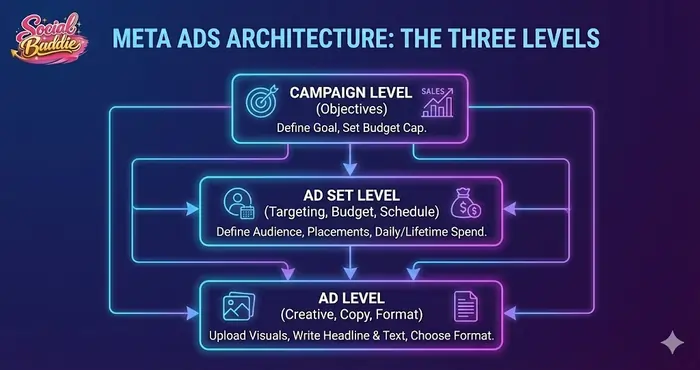
The most important concept to master is the Power Editor hierarchy. If this structure is messy, your data will be messy.
1. The Campaign Level (The Strategy)
This is where you choose your Objective. Think of the objective as telling Meta’s AI, “Go find people who do this specific thing.”
- Awareness: Find people who will remember your brand.
- Traffic: Find “clickers” (not necessarily “buyers”).
- Leads: Find people willing to fill out a form.
- Sales: Find people with a history of hitting the “Purchase” button.
A common mistake is choosing “Traffic” when you actually want “Sales” because traffic is cheaper. This is a trap. If you ask for traffic, Meta will give you people who click on everything but buy nothing. Always align your campaign objectives with your actual business goal.
2. The Ad Set Level (The Logistics)
This is the “brain” of your operation. Here, you define:
- Targeting: Using Meta Audience Insights to find your demographic.
- Budget: Setting your daily or lifetime spend.
- Placements: Deciding if your ad appears on Instagram Reels, Facebook Feed, or Messenger.
3. The Ad Level (The Creative)
This is what the customer actually sees. It’s the combination of your image/video, your headline, and your “Shop Now” or “Learn More” button. In the modern era of Meta advertising, the creative does the targeting. If your ad shows a woman running, Meta will naturally show it to people interested in fitness.
Part 3: The Technical Foundation (Setting Up for Success)
Before you spend a single dollar, your “plumbing” must be correct. If your tracking is broken, you are essentially throwing money into a black hole.
The Meta Business Suite vs. Ads Manager
Many beginners start by hitting the “Boost Post” button. Stop doing this. Boosting a post is a simplified version of advertising that lacks the robust targeting and optimization features of the Meta Ads Manager.
To do this right, you need a Meta Business Account. This acts as the “umbrella” that holds your Page, your Instagram account, and your Ad Account in one secure place.
The Meta Pixel and Conversions API (CAPI)
The Meta Pixel is a small piece of code you place on your website. It allows Meta to see what people do after they click your ad.
- Did they view a product?
- Did they add to cart?
- Did they buy?
In 2024 and beyond, the Pixel alone isn’t enough due to privacy changes (like iOS14). You should also set up the Conversions API, which sends data directly from your server to Meta, ensuring your tracking remains accurate even when browsers block cookies.
Part 4: Targeting Strategy (Who Sees Your Ad?)
There are three main types of audiences you can build in Meta. Understanding how to balance them is the difference between a 1x ROI and a 5x ROI.
1. Core Audiences (The Basics)
These are based on demographics: age, gender, location, and interests. While this used to be the bread and butter of Meta Ads, interest-based targeting is becoming less “precise” as Meta moves toward Broad Targeting.
2. Custom Audiences (Warm Traffic)
This is “Retargeting.” You can create an audience of people who have already interacted with you—perhaps they watched 50% of your video or visited your pricing page. This is your most profitable audience because they already know and trust you.
3. Lookalike Audiences (LAL)
This is Meta’s “clone” tool. You give Meta a list of your 1,000 best customers, and the algorithm finds the 1% of the population that most closely resembles them. Lookalike audiences are a powerful way to scale once you have enough baseline data.
The Rise of “Broad” Targeting
For beginners, the biggest shift is toward Broad Targeting. Instead of picking 50 interests like “Yoga” and “Lululemon,” you leave the targeting wide open (only age, gender, and location) and let the Meta Algorithm find your buyers. This works because Meta’s AI is now smarter than human marketers at finding patterns in user behavior.
Part 5: Creative Strategy (The Engine of Performance)
In today’s landscape, Creative is the most important variable. You can have the perfect technical setup, but if your ad is boring or confusing, you will fail.
The Anatomy of a High-Converting Ad
- The Hook (The first 3 seconds): You must stop the scroll. For video, this means movement or a bold statement. For images, this means high contrast and a clear focal point.
- The Body (The Value): Focus on the benefit, not the feature. Don’t say “This vacuum has a 400w motor.” Say “Clean your whole house on one charge.”
- The CTA (Call to Action): Tell them exactly what to do. “Click the link below to get 20% off your first order.”
Beginner-Friendly Formats
- UGC (User Generated Content): This is content that looks like a regular post from a friend. It is currently the highest-performing format on Instagram Reels Ads.
- Carousels: Great for showcasing a range of products or a “step-by-step” process.
- Static Images: Never underestimate a clean, high-quality photo with a clear text overlay.
Part 6: Budgeting and the “Learning Phase”
How Much Should You Spend?
A common question is: “What is the minimum budget?” While you can start with $1/day, a realistic learning budget is **$5–$10 per ad set per day**.
Think of your first $200–$500 as Market Research Spend. You aren’t just buying sales; you are buying data that tells you which headlines work and which audiences are too expensive.
Respecting the Learning Phase
Every time you launch a new ad set, it enters the Learning Phase. This is when Meta’s AI is experimenting to see who likes your ad. During this time (usually the first 7 days or until you get 50 conversions), performance will be volatile.
- Mistake: Changing your budget or ad every 24 hours.
- Solution: Be patient. If you touch your ad set during this phase, the clock resets, and the AI has to start over.
Part 7: Metrics That Actually Matter
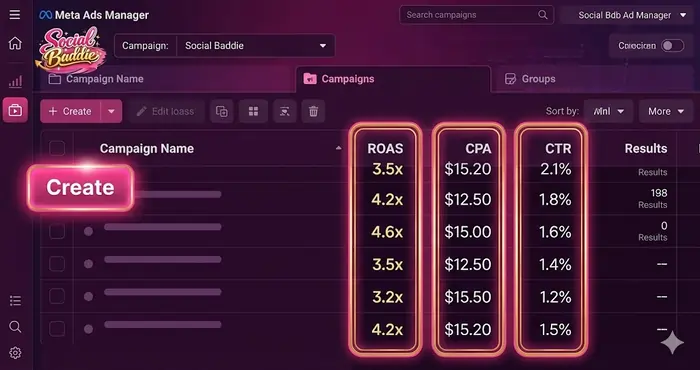
When you open Ads Manager, you will see dozens of columns. Ignore 90% of them. Focus on these “Big Four”:
- ROAS (Return on Ad Spend): For every $1 you spend, how many dollars do you make? (The ultimate metric).
- CPA (Cost Per Acquisition): How much does it cost you to get one customer? Compare this to your profit margin.
- CTR (Click-Through Rate): Anything above 1% is generally “healthy.” If it’s below 1%, your creative is likely boring.
- CPC (Cost Per Click): How much you pay for each visitor.
Check the Meta Reporting Tools weekly, not hourly. Meta’s reporting is often delayed by 24–48 hours, so making decisions based on “today’s” data is a recipe for disaster.
Part 8: Common Pitfalls and Compliance
Meta is a strict landlord. If you break their Advertising Policies, they won’t just reject your ad—they will ban your entire account.
Why Ads Get Rejected
- Personal Attributes: You cannot imply you know something about the user. Avoid “Are you struggling with debt?” Use “Debt can be overwhelming” instead.
- Misleading Claims: No “Before and After” photos for weight loss, and no promises of “getting rich overnight.”
- Low-Quality Landing Pages: If your ad goes to a website full of pop-ups or broken links, Meta will penalize you.
Part 9: A Step-by-Step Launch Checklist
To ensure your first campaign isn’t a “flame out,” follow this sequence:
- Verify your domain: Go to Business Settings > Brand Safety and prove you own your website.
- Set up your Pixel: Install it via Shopify, WordPress, or GTM.
- Define your “Break-Even” point: Know exactly how much you can afford to pay for a lead before you lose money.
- Create 3 Ad variations: Try one video, one image, and one carousel.
- Launch at Midnight: Start your ads at the beginning of the day so the budget spends evenly over 24 hours.
- The “Hand-Off” Rule: Leave it alone for 72 hours. No matter how tempted you are to tweak, let the algorithm breathe.
Part 10: Scaling Your Success
Once you find an ad that is consistently bringing in customers at a profitable rate, it’s time to scale your budget.
There are two ways to scale:
- Vertical Scaling: Increase the budget of your winning ad set by 10–20% every 2–3 days. If you double the budget instantly, you will likely break the algorithm’s optimization and performance will tank.
- Horizontal Scaling: Take your winning creative and test it against new audiences or in new placements.
Final Takeaway: The Long Game
Meta Ads are not a “slot machine” where you pull the lever and hope for a jackpot. They are a predictable engineering system.
Success comes to those who are willing to:
- Test at least 2–4 new creatives every month.
- Keep their Business Manager permissions organized.
- View “failed” ads as data purchases rather than losses.
You now have the framework to go from a confused beginner to a competent advertiser. The interface will change, buttons will move, and names will be rebranded, but the fundamental principles of Objective, Audience, and Creative will remain constant.

