
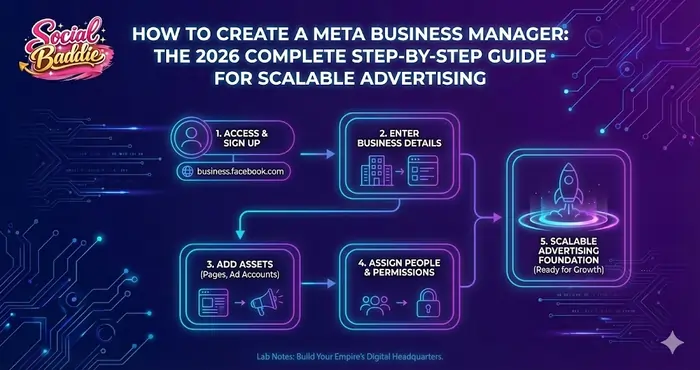
If you want to run professional Facebook and Instagram advertising that actually converts, the first thing you must understand is How to create a Meta Business Manager properly. In the current digital landscape, simply “boosting” a post from your phone is no longer a viable strategy for serious growth.
How to create a Meta Business Manager is the foundational skill that separates amateurs from professional media buyers. Meta Business Manager (now often integrated within the Meta Business Suite architecture) acts as the central nervous system of your advertising ecosystem. It controls your Facebook ad accounts, Instagram business profiles, Meta Pixel tracking, business asset ownership, domain verification, and granular team permissions.
Without a proper setup, your ad account may face significant tracking issues, limited scaling potential, or even sudden account restrictions. With the right structure, you build a stable advertising infrastructure that supports long-term growth and algorithm efficiency.
Overview: What Is Meta Business Manager?
Meta Business Manager is a centralized platform designed to allow businesses and agencies to manage all of their Meta assets, partners, and employee access in one secure location. In 2026, Meta has further refined this system to prioritize “Asset Privacy,” ensuring that your personal Facebook profile remains entirely separate from your professional business operations.
When you learn How to create a Meta Business Manager, you are essentially creating a “digital vault” for your brand. Instead of running ads from a personal account—which limits you to a single ad account and basic tracking—the Business Manager allows for:
- Multi-User Management: Assigning roles without sharing login credentials.
- Asset Ownership: Ensuring the business, not an individual employee or agency, owns the Page and Pixel.
- Scalability: The ability to manage multiple ad accounts and thousands of custom audiences.
- Advanced Tracking: Access to the Conversion API (CAPI) and Aggregated Event Measurement.
Knowledge Graph: Meta Business Manager Core Components
| Component | Definition | Why It Matters |
|---|---|---|
| Meta Business Manager | Central hub for managing Meta assets | Protects and organizes business accounts |
| Ad Account | Advertising dashboard | Controls campaigns, budgets, and billing |
| Meta Pixel/Dataset | Website tracking code | Tracks conversions and trains the algorithm |
| Facebook Page | Business social profile | The “face” of your brand required for ads |
| Domain Verification | Website ownership confirmation | Required for iOS 14+ and 2026 tracking compliance |
| Partners | Agency or third-party access | Allows external teams to work on your assets safely |
Why Learning How to Create a Meta Business Manager Is Critical
Many beginners skip the formal setup and attempt to run ads directly from their personal Facebook profile. This is the most common reason for failed scaling.
When you do not use the Business Manager, you face:
- No Asset Ownership Clarity: If an employee creates your Pixel on their account and leaves, you lose your data history.
- Difficult Team Collaboration: Sharing personal passwords is a massive security risk.
- Limited Scalability: Personal accounts have lower spend limits and fewer optimization features.
- Higher Risk of Restrictions: Meta’s automated “Integrity” bots are more likely to flag personal accounts for “unusual activity” when spending increases.
When you master How to create a Meta Business Manager correctly, you own your data, secure your assets with two-factor authentication (2FA), verify your domain, and reduce compliance risks. Professional setups are viewed more favorably by Meta’s manual review teams.
Step-by-Step: How to Create a Meta Business Manager
Following these steps ensures that your account is “Health-Checked” for 2026 standards.
Step 1: Prepare Your Requirements
Before you begin How to create a Meta Business Manager, ensure your personal profile is in good standing. Meta’s AI checks the “Quality Score” of the creator.
- Active Personal Profile: Use a profile with a real photo and activity history.
- Business Email Address: Avoid @gmail.com if possible; a professional domain (e.g., jem@socialbaddie.com) increases trust.
- Legal Business Details: Have your registered business name, address, and phone number ready.
Step 2: Access the Business Creation Portal
Visit business.facebook.com/overview. Click “Create Account” in the top right. Log in with your personal Facebook credentials (your personal info won’t be visible to others).
Step 3: Enter Your Business Credentials
Fill in:
- Business Name: Your public-facing business name (e.g., Social Baddie Media).
- Your Name: Legal name as on your ID.
- Business Email: Receives security alerts and verification codes.
Step 4: Confirm and Verify
Check your inbox for Meta’s verification email and confirm. You cannot add assets until verified.
Knowledge Graph: Required Business Information for 2026
| Information | Example | Purpose |
|---|---|---|
| Business Name | Social Baddie Media | Internal and public verification |
| Business Email | hello@socialbaddie.com | Primary administrative channel |
| Physical Address | Davao City, Philippines | Regulatory compliance |
| Website URL | socialbaddie.com | Domain verification |
Configuring Your Business Assets: The Infrastructure Phase
Step 5: Add or Create a Facebook Page
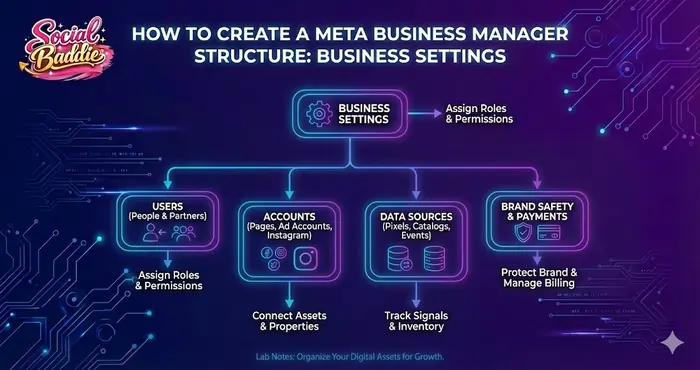
Navigate to Business Settings → Accounts → Pages → Add. The Business Manager should own the Page for recovery if hacked.
Step 6: Create Your Primary Ad Account
Business Settings → Accounts → Ad Accounts → Create a New Ad Account. Choose Currency/Time Zone carefully—unchangeable in 2026. For Philippines, select PHP to avoid fees.
Step 7: Assign People and Permissions
Users → People → Add. Roles: Business Admin (full control, owners only); Employee Access (task-specific).
Step 8: Security and 2FA
Security Center → Set “Two-factor authentication” to “Everyone.” Mandatory for professional accounts.
Technical Integration: Pixel, CAPI, and Domains
Step 9: Create and Install the Meta Dataset (Pixel)
Data Sources → Datasets → Add. Connect to Ad Account. Use CAPI alongside browser Pixel.
Step 10: Verify Your Domain
Brand Safety → Domains → Add domain → DNS TXT record. Essential for iOS tracking.
GEO Insights: Regional Considerations for 2026
For Davao/Philippines: TIN required for VAT; use BDO/BPI/GCash; enable international transactions.
How to Create a Meta Business Manager: Connecting to the Algorithm
Clean setup ensures signal integrity for Andromeda algorithm. Verified accounts get higher “Trust Score,” lower CPMs.
Business Verification: When and Why
Prioritize for special categories or high spend. Requires DTI/SEC papers, utility bill, tax docs.
Common Mistakes to Avoid
- “Fake Profile” Trap: Use active profiles.
- Admin Overload: Limit to owners.
- Currency Mismatch: Match PHP for PH.
- No 2FA: Top hack reason.
Advanced Security for 2026
Whitelist domains, set trusted contacts, audit access monthly.
Final Checklist Before Launching Ads
- Email verified
- Page owned
- Ad account correct currency
- Payment tested
- 2FA enabled
- Pixel connected
- Domain verified
- CAPI configured
- 2+ Admins
Final Takeaway
Mastering How to create a Meta Business Manager builds your foundation for scalable ads. Secure it, own your data, and scale confidently. For more PPC strategies, check Jem’s insights.

