
In the high-stakes world of digital marketing in 2026, knowing how to avoid Meta ad account restrictions is the difference between a scaling business and a sudden, expensive shutdown. For many beginners, a restricted account feels like “bad luck.” At Social Baddie, we view it differently: a restriction is simply a response to a collection of high-risk signals documented in the official Meta advertising restrictions help resources.
If you are treating Meta Ads as a primary growth engine, you cannot afford to operate on “convenience.” You must operate on infrastructure. This guide is the definitive manual for building a resilient, ban-proof advertising system that can withstand the scrutiny of Meta’s 2026 AI-driven compliance engines and align with the Meta Advertising Standards and Meta Business Help Center guidelines.
Quick Definition: What Is a Meta Ad Account Restriction?
A Meta ad account restriction occurs when the platform’s automated security systems or manual review teams limit your ability to spend money, launch ads, or manage assets, as outlined in About advertising restrictions in the Meta Business Help Center. Unlike a simple ad disapproval—where a single creative is rejected—an account restriction paralyzes your entire funnel and typically appears inside the Account Quality section or Business Support Home.
In 2026, these restrictions have evolved into three distinct tiers:
- Identity Checkpoints
Triggered by suspicious logins, device changes, or billing profile edits, and usually surfaced via Troubleshoot a disabled or restricted account in the Meta Business Help Center. Often resolved with two-factor authentication (2FA), device confirmation, or ID upload. - Asset-Level Restrictions
Your Pixel, domain, or Page is “red-flagged,” preventing you from tracking conversions or running ads associated with that asset, even if other parts of your setup look fine, which is covered under About advertising restrictions and Account Quality documentation. - Account Disablement
The most severe outcome is full account disablement. In these cases, Meta points you to Request a review for a restricted advertising account at the review request page, and how you structure that appeal can determine whether your disablement becomes permanent.
The Mechanics of Risk Stacking: How to Avoid Meta Ad Account Restrictions by Managing Signals
Meta’s AI operates on a trust-based risk model. Think of your ad account as having a credit score, similar to how the ecosystem is described in expert breakdowns of restriction patterns such as the guidance from SuperAds on restricted Facebook ad accounts and policy roundups like the Revealbot 2026 Meta advertising policies guide. How to avoid Meta ad account restrictions effectively comes down to a concept we call Risk Stacking.
Meta rarely bans an account for one minor mistake. Instead, they ban accounts where multiple negative signals overlap simultaneously.
The Risk Stacking EquationNew Account Status+Aggressive Scaling+Policy-Edge Creative+Billing Issues=Immediate Restriction
For example, if an established Business Manager with a 3‑year history increases its budget by 50%, Meta’s AI views it as normal growth. If a 3‑day‑old account increases its budget by 50%, Meta’s AI may read that as a “compromised account” or “fraudulent activity” and lock it down according to the patterns described in How to fix a restricted Facebook Ads account.
Behavioral Trust Signals in 2026
| Signal Category | High-Trust (Safe) | High-Risk (Restriction Trigger) |
|---|---|---|
| Login Stability | Consistent IP/location and devices, no suspicious logins documented | Frequent VPN use, residential proxies, or multiple-country logins, often seen in profile-level restriction threads on r/FacebookAds |
| Account Age | 6+ months of consistent spend and approvals | “Ghost” accounts with sudden 500 USD/day spend and no prior history |
| Compliance History | 95%+ ad approval rate, rare serious violations aligned with Meta advertising standards | Repeated disapprovals for policy violations or “Circumventing Systems” |
| Asset Structure | Verified Business Portfolio in Meta Business Suite using role-based access | Personal ad accounts with password sharing and no business verification |
| Signal Health | Server-side CAPI implemented, consistent event quality as recommended in the Revealbot Meta policy guide | Browser-only Pixel, high data loss, mismatched reported vs observed conversions |
Infrastructure vs. Convenience: How to Avoid Meta Ad Account Restrictions Through Professional Setup
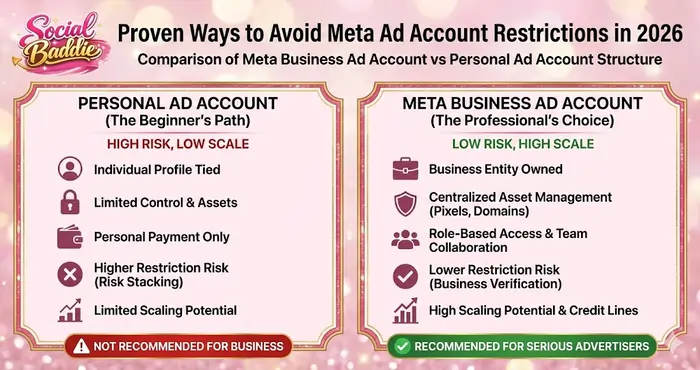
One of the most common mistakes beginners make is prioritizing ease of use over structural integrity. In 2026, Meta has made it clear through its documentation and tooling that it prefers working with business entities set up in Meta Business Suite over casual personal setups. This is exactly the structural thinking we emphasize inside Social Baddie Lab Notes – PPC.
The Personal Profile Trap
Running ads through a personal ad account is like building a house on a fault line. Because the ad account is tied to your personal social identity, any personal mistake—like a controversial post, name violation, or hacked profile—can trigger a profile-level restriction, which then cascades into business assets, as many advertisers report in threads like Profile-level Meta Ads restriction.
The 2026 “Meta Verified” Business Advantage
Meta now offers a Meta Verified for businesses subscription that acts as a trust booster for serious advertisers:
- Impersonation Protection
Helps protect your Page and Instagram from fake clones and malicious reporting, as described in Meta’s official announcement “Expanding Meta Verified to businesses”. - Enhanced Support
Provides priority chat/email support for faster appeals and troubleshooting beyond the standard help center flow. - Verified Badge
Adds a visible badge and internal signal that your business identity has passed additional checks, complementing your existing business verification and Ads compliance efforts, as analyzed in “Meta Verified for Businesses: Is it worth it?”.
For brands that rely heavily on Meta Ads, this is a strategic anti-restriction layer to consider alongside your broader Social Baddie infrastructure.
Content Compliance 2026: How to Avoid Meta Ad Account Restrictions in Your Creative Process
Creative is now the primary lever for targeting and performance, but it is also the #1 lever for bans. Meta’s automated systems can read image text, parse video hooks, and scan landing pages for deceptive patterns, as outlined in policy breakdowns like the Revealbot Meta policy guide and Midsummer Agency’s Meta advertising policy article.
The “Personal Attribute” Language Filter
Meta’s policy against Personal Attributes remains one of the most common sources of ad rejections and account quality issues, as described in the public-facing Meta Advertising Standards. You cannot imply that you know something about the user’s personal situation.
| Forbidden Phrase (Trigger) | Compliant Alternative (Safe) |
|---|---|
| “Are you tired of back pain?” | “Solutions for persistent back discomfort.” |
| “Is your business failing?” | “Strategies for underperforming businesses.” |
| “Since you are a Filipino advertiser…” | “For the Philippine advertising community.” |
| “Lose 10lbs in your first week!” | “Our community reports noticeable weight loss.” |
2026 Prohibited Content Deep Dive
- Unrealistic Expectations
“Make 10k in 30 days”‑type claims are prime examples of misleading or unverifiable claims, a category highlighted in in-depth policy explainers such as Complete guide to Meta ad policies (Revealbot). - Low-Quality Landing Pages
Slow load times, aggressive pop-ups, or missing Privacy Policy / Terms of Service contribute to a Low Quality or Disruptive Experience. These experiences are explicitly called out as risk areas in guides like Meta advertising policy: Rules and restrictions. - Before-and-After Imagery
Side-by-side transformations in weight loss, cosmetic, or health verticals remain highly restricted and are cited across multiple policy summaries, including the Revealbot Meta policy guide.
Financial Integrity and Billing Strategy
Your payment method is your financial fingerprint. Meta cross-references cards, PayPal accounts, and business entities to detect networks of banned or risky advertisers, which is why billing behaviour is heavily discussed in troubleshooting guides like Facebook Ads account restricted? Here’s how to fix it.
If you use a card that has been associated with a previously banned account—yours or someone else’s—you can be restricted within minutes of launching your first ad due to payment method association.
Best Practices for Billing
- Avoid Disposable Virtual Cards
Many “throwaway” or ultra-cheap virtual cards are treated as high-risk by fraud systems, a pattern frequently mentioned in practitioner guides like the SuperAds restriction article. - Match the Name
The name on your Meta Business Portfolio and generated invoices should match (or clearly relate to) the name on your billing method, as misalignment is described as a suspicious pattern in Meta’s “About advertising restrictions” document. - Use the “Pre-Fund” Method When High-Risk
In sensitive niches or new markets, pre-funding your ad account balance (where available) can reduce the frequency of repeated authorization checks that often trigger bank declines and downstream restrictions. - Zero Tolerance for Failed Payments
Set up a secondary backup card. Even a single insufficient funds event can drop your account’s overall trust score and make it more vulnerable to creative-based restrictions later, as noted in restriction troubleshooting guides.
Technical Signal Integrity: Why CAPI Is a Trust Marker
In 2026, the Conversions API (CAPI) is more than a tracking upgrade—it is a signal quality and trust indicator. Meta and third-party guides emphasize that CAPI helps reconcile server-side events with browser signals, reducing noise and disputes around performance.
When you only use a browser-based Pixel:
- Ad blockers and privacy settings can strip out a large chunk of your signals.
- Meta’s view of your performance may not match your internal numbers, creating signal mismatch.
If Meta sees that you report 100 sales while their systems can only corroborate 30, you may be flagged for misleading results or invalid traffic patterns, a risk category discussed in guides like the Revealbot Meta advertising policies guide.
How to Avoid Meta Ad Account Restrictions With CAPI
- Implement a server-side gateway—either via built-in CAPI gateways, official partner integrations, or a custom server, as recommended in many 2026 Business Suite/CAPI tutorials.
- Ensure event deduplication is 100% correct between Pixel and CAPI.
- Maintain a Match Quality Score of around 6.0 or higher for your key events.
A high Match Quality Score tells Meta that your business is technically mature and transparent, which reduces your overall risk profile.
The 2026 “Social Baddie” Forbidden Word List
To maintain a 10/10 compliance rating, your copywriters should avoid these red-flag word families that frequently drag ads into manual review queues. Many of these clusters map to sensitive categories in the Meta Advertising Standards and the third-party policy guides mentioned earlier.
| Category | Words to Avoid | Why? |
|---|---|---|
| Financial | Profit, Income, Cash, Crypto, Guaranteed, Wealth | Triggers “MLM/Scam” and get‑rich‑quick filters |
| Health | Cure, Heal, Treatment, Thin, Fat, Disease | Triggers “Medical/Health Claims” filters |
| Urgency | Last Chance, Hurry, Ending Now, Don’t Miss | Triggers “Clickbait / Low Quality” flags |
| Attributes | You, Yours, Yourself, Why are you, Are you | Triggers “Personal Attributes” violations |
When in doubt, cross-check your language against the public-facing Meta advertising standards overview and your own patterns inside The Growth Lab content.
Strategic Appeals: How to Avoid Meta Ad Account Restrictions Becoming Permanent
If the worst happens and you are restricted, your first 24 hours determine your long-term odds. Most beginners send an emotional, angry message to support; this is a mistake. The more professional your communication is, the better it aligns with guidance in Troubleshoot a disabled or restricted account and Request a review for a restricted advertising account in the Meta Business Help Center.
The Anatomy of a Professional Appeal
When requesting a review via Account Quality or Business Support Home:
- Acknowledge Policy Knowledge
Reference that you have reviewed the Meta Advertising Standards and specify the section—such as misleading claims, personal attributes, or discriminatory content. - State the Fix
Briefly explain what you changed (creative, landing page, funnel) to comply with those standards, in line with best practices shared in “how to fix restricted account” guides like SuperAds’ step-by-step guide. - Emphasize Long-Term Partnership
State that as a verified or serious business advertiser, you are committed to providing a safe, high-quality user experience on Meta platforms. - Submit Documentation
Attach business registration documents, tax IDs where relevant, and a screenshot confirming 2FA on core admin profiles, as recommended in Troubleshoot a disabled or restricted account.
Lab Note Secret: Do not appeal more than once every 48 hours. Repeated ticket submissions and “bumping” can be treated as spammy behavior, something many advertisers have learned the hard way in 2025–2026 case studies and forum discussions.
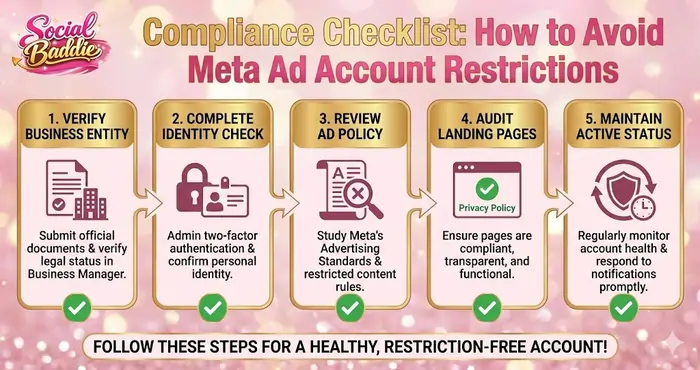
Comprehensive Checklist: The 2026 Anti-Restriction Routine
Follow this routine at Social Baddie to keep your accounts green, compliant, and ready to scale. It fits perfectly as a recurring checklist topic in your Lab Notes – PPC.
Daily
- Check Account Quality and Business Support Home for any new flags, drawing on Meta’s guidance in About advertising restrictions and Troubleshoot a disabled or restricted account.
- Monitor ad comments for “scam,” “fraud,” or spam reports and respond or hide when appropriate, since negative feedback is explicitly mentioned as a risk signal in practical troubleshooting guides like SuperAds’ restriction article.
Weekly
- Audit billing thresholds and outstanding balances in your payment settings to ensure no payments are pending or failing.
- Review ad disapproval trends. If more than 5% of ads are rejected, pause new launches and adjust your copy/creative strategy with reference to the Meta Advertising Standards and third‑party policy explainers.
Monthly
- Update User Permissions in Business Manager. Remove former employees, agencies, or freelancers to avoid “restricted user” contamination as recommended in Meta’s broader business verification and security content.
- Verify Domain and Page health using tools like Google Search Console and security scanners, since Meta cross-references external security and malware signals along with its own policy checks.
Final Strategic Conclusion
Mastering how to avoid Meta ad account restrictions is not about “gaming the system”—it is about respecting the ecosystem defined in the Meta Advertising Standards and operationalized through the Meta Business Help Center. Meta’s goals in 2026 are user retention and platform safety. When your advertising setup aligns with those goals through professional infrastructure, clear compliance, and financial stability, the platform becomes your strongest scaling partner.
Amateurs look for “hacks” to bypass bans. Professionals build systems that never get banned in the first place. Use this guide as a foundational playbook within Social Baddie and your PPC Lab Notes to maintain signal health, protect your ad accounts, and keep every scaling session smooth and sustainable.

