
Introduction
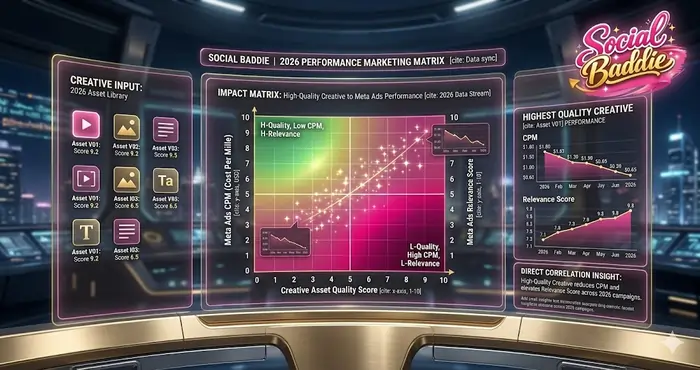
When starting with Meta Ads, beginners often focus heavily on targeting while neglecting one of the most critical elements of campaign performance: ad creative. Common Ad Creative Mistakes in Meta Ads are responsible for wasted budgets, low engagement, and poor learning signals for the algorithm.
In 2026, Meta’s AI-driven delivery prioritizes creative quality and user engagement signals over simple interest targeting. Understanding these mistakes and how to fix them is essential for beginners to maximize ROI and accelerate results. This article will cover the most frequent errors, their impact on campaigns, actionable fixes, and frameworks to create scroll-stopping ads—even if you’re not a designer. Mastering these fundamentals is a key part of your journey through our PPC lab notes.
Why Ad Creative Is the Most Important Factor in Meta Ads
Meta’s algorithm evaluates ad creative before targeting, determining who sees your ad, at what cost, and how often. Beginners often underestimate this, assuming targeting alone drives conversions. In fact, modern media buying has shifted toward “Creative-Led Growth.”
The Shift from Manual Targeting to Algorithmic Matching
In the early days of Facebook advertising, success was found in “ninja” interest targeting—finding that one obscure group that your competitors missed. Today, with the rollout of the Meta Lattice AI, the machine is smarter than the human. The algorithm uses your creative as the primary signal to find your audience. If your ad features a yoga mat, the AI identifies the visual and the text, then finds users currently exhibiting “Yoga Intent.”
Key performance impacts of poor ad creative:
- Low CTRs (Click-Through Rates): Weak visuals or unclear messaging reduce the probability of a user stopping their scroll.
- High CPMs (Cost per 1,000 Impressions): Meta rewards high-quality content. If your ad is ignored or hidden by users, the auction “penalizes” you with higher costs to reach the same audience.
- Poor Conversions: Even if you get the click, misaligned ad copy and visuals reduce the likelihood of the user taking the final action on your landing page.
Meta Ads measures User Value, which includes video completion, clicks, comments, and other engagement signals. Beginners who overlook creative quality end up paying more for less. To stop the bleed, you need to implement strategies found in The Growth Lab.
The Psychology of “The Scroll”
Before we dive into the mistakes, we must understand the environment. Social media is a “passive intent” platform. Unlike Google Search, where users are looking for a solution, Meta users are looking for entertainment. Your ad is an uninvited guest in their feed. To succeed, you must master the Pattern Interrupt.
Cognitive Load and Decision Fatigue
Users are bombarded with thousands of stimuli every hour. Their brains have evolved to filter out anything that looks like a “traditional” advertisement. This is why “corporate” looking ads often fail for beginners—they trigger immediate ad blindness.
Top 10 Common Ad Creative Mistakes in Meta Ads Beginners Make
Mistake 1: Weak or Unclear Headlines
Headlines are the first gatekeeper of your budget. Beginners often write generic statements like “Buy Now” or “Check This Out.” These offer no value and create no curiosity.
- The Impact: Users don’t know why they should stop.
- The Solution: Use the Hook–Problem–Solution (HPS) formula.
- Practical Framework: * Hook: Capture attention with a bold claim or question.
- Problem: Highlight a specific pain point the user is feeling.
- Solution: Present your offer as the logical relief.
- Example: “Tired of Low Sales? Boost Conversions in 7 Days with This Simple Tool.”
Mistake 2: Poor Visual Quality & Aspect Ratio Errors
Low-resolution, pixelated, or poorly cropped images make ads look unprofessional and untrustworthy. Furthermore, using a landscape (16:9) image in a Story placement (9:16) creates ugly gray bars that scream “I don’t know what I’m doing.”
- The Impact: Reduces trust, engagement, and CTR.
- The Solution: Use high-resolution images and correct aspect ratios. Meta Business Help recommends 1080x1080px for feed posts and 1080x1920px for Stories.
Mistake 3: Overcrowded Text or Copy
Ads with too much text in the image overwhelm users. While Meta removed the hard “20% text rule” penalty, the psychological penalty remains.
- The Impact: Reduced ad delivery and high “skip” rates.
- The Solution: Focus on concise, benefit-driven copy. Highlight one key point in the visual and put the supporting details in the caption. According to Nielsen Norman Group, users scan in an F-pattern—ensure your value proposition is in that primary scan line.
Mistake 4: Over-Reliance on Generic Stock Photos
Generic photos of “business people shaking hands” or “smiling customers” feel fake. They don’t represent your brand’s unique identity.
- The Impact: Low relevance and low engagement.
- The Solution: Use visuals that reflect your actual product, service, or target audience. Even simple smartphone photos or screenshots can outperform generic imagery. High-performing ads in 2026 leverage User-Generated Content (UGC) to build authenticity.
Mistake 5: Ignoring Video Specifications & The “First 3 Seconds”
Video is the dominant format, yet beginners often treat it like a TV commercial with a slow build-up. In social media, if you don’t catch them in 3 seconds, they are gone.
- The Impact: High drop-off rates and wasted video production costs.
- The Solution: Front-load the value. Use a visual hook in the first 1.5 seconds. Always follow Meta’s recommended specs: vertical (9:16), <15 seconds for mobile-first, and include captions for sound-off users.
Mistake 6: Using the Wrong Call-to-Action (CTA)
A misplaced or unclear CTA creates friction in the user journey.
- The Impact: Fewer clicks and lower conversion rates.
- The Solution: Align the CTA button with the actual offer. For example, use “Sign Up” for lead generation or “Shop Now” for e-commerce. Don’t use “Learn More” if you want them to buy immediately.
Mistake 7: Irrelevant Imagery for Target Audience
Ads must resonate with the audience’s context. If you are targeting 60-year-olds with imagery featuring 20-year-olds, there is a “relevance gap.”
- The Impact: The user thinks “this isn’t for me” and continues scrolling.
- The Solution: Tailor visuals to the demographic. Use Custom Audiences to show specific visuals to specific life-stage groups.
Mistake 8: Lack of Creative Testing (The “One Ad” Trap)
Beginners often launch a campaign with a single image. If that image fails, they assume “Facebook ads don’t work.”
- The Impact: The algorithm has no “options” to optimize toward.
- The Solution: Test 3–5 creative variations per ad set. Use A/B testing to systematically identify which hook, visual, or headline performs best.
Mistake 9: Misalignment With Landing Page (Broken Scent)
If your ad promises a “50% Discount” but the landing page shows a “10% Discount,” users feel cheated.
- The Impact: High bounce rates and wasted ad spend.
- The Solution: Ensure messaging, visuals, and offers match perfectly. Maintain “Message Scent” to ensure the transition from the ad to the website is seamless.
Mistake 10: Ignoring Meta’s Automated Creative Tools
Meta has invested billions into Advantage+ Creative, which automatically tweaks brightness, crops images, and swaps headlines to see what works for specific users.
- The Impact: You are essentially fighting the AI instead of using it.
- The Solution: Enable Advantage+ Creative at Social Baddie to let Meta optimize ad creative in real-time based on actual user data.
Impact of These Mistakes on Campaign Performance
| Mistake | Primary Metric Impact | Long-Term Strategic Solution |
| Weak Headline | Low CTR (Click-Through Rate) | Implement HPS (Hook-Problem-Solution) Framework |
| Poor Visuals | Low Engagement / Trust | High-res assets with correct aspect ratios |
| Overcrowded Copy | Reduced Delivery / High CPM | Benefit-driven, concise primary text |
| Generic Stock | Low Relevance / Ad Blindness | Native, UGC, or authentic brand visuals |
| Video Specs | Poor Reach / Low View-Through | Vertical, 15-sec max with “Hook” at start |
| Wrong CTA | Lower Conversion Rate | Funnel-aligned CTA buttons |
| Irrelevant Imagery | Low Engagement Signals | Contextual visuals matching the audience |
| No Testing | Algorithm Stagnation | Run 3-5 variants to feed the Lattice AI |
| Misalignment | High Bounce Rate / Waste | Maintain “Visual Scent” across the funnel |
| Ignoring AI | Slower Optimization | Enable Advantage+ Creative features |
Advanced Solutions for Beginners
Mastering the HPS Formula
The Hook-Problem-Solution formula is the backbone of The Growth Lab. It works because it follows the natural path of human problem-solving.
- The Hook: Stops the pattern (e.g., “Most marketers are lying to you about Meta Ads.”)
- The Problem: Agitates the pain (e.g., “You are spending money but your CPA is rising every week.”)
- The Solution: Offers the relief (e.g., “Our PPC lab notes show you how to stabilize your ROAS.”)
Leveraging Simplification Tools
You do not need to be a Photoshop expert. Tools like Canva or Figma provide templates that are already optimized for high performance. The goal is clarity, not artistic complexity.
The Beginner-Friendly Testing Framework
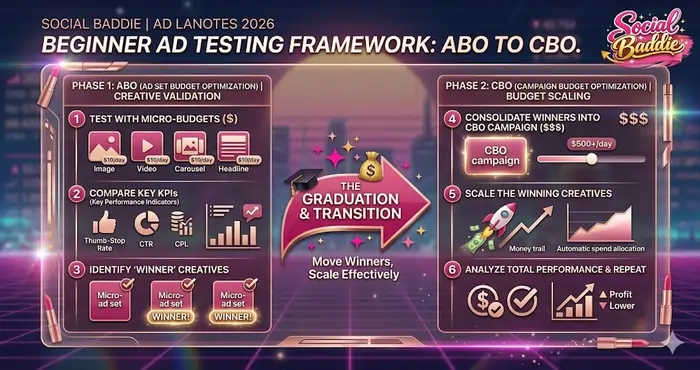
How do you actually implement these fixes without going crazy? Follow this three-phase approach:
Phase 1: Creative Validation (ABO)
Run 3–5 creatives per ad set using ABO (Ad Set Budget Optimization). This ensures each creative gets enough budget to prove itself. Look for the creative with the highest Hook Rate (3-second views / impressions).
Phase 2: Budget Optimization (CBO)
Move the winning creatives (the ones that actually converted) into a CBO (Campaign Budget Optimization) campaign. Let Meta’s AI decide which of the “proven” ads gets the most money in real-time.
Phase 3: AI-Driven Scaling
Enable Advantage+ features. At this stage, your job is to “feed the machine” new versions of your winning ads (e.g., change the background color or the headline of your best-performing ad).
Creative Fatigue: The Silent Campaign Killer
Even if you avoid all the mistakes, an ad will eventually “die.” This is ad fatigue.
Signs of Fatigue:
- Rising Frequency: Your target audience has seen the ad 3+ times.
- Falling CTR: People are so bored of the ad they stop clicking.
- Rising CPA: Because the CTR is low, the algorithm has to work harder to find buyers, increasing your costs.
The Refresh Strategy:
Don’t reinvent the wheel. If a video worked, don’t change the script—just change the first 3 seconds (the hook). This “resets” the fatigue in the eyes of the user and the algorithm.
Knowledge Graph: Creative Optimization Overview
| Component | Strategic Function | Outcome for the Advertiser |
| Hook | Grab attention in the feed | Higher CTR & Thumb-Stop Rate |
| Visual | Represent brand promise | Higher engagement & user trust |
| Copy | Communicate unique value | Increased conversion intent |
| CTA | Direct the user’s action | Lower CPA & Better ROAS |
| Testing | Identify winning angles | Optimized delivery & less waste |
| Automation | Leverage Meta’s AI power | Faster scaling & real-time tweak |
Final Strategic Conclusion
Avoiding Common Ad Creative Mistakes in Meta Ads is not about being an artist; it’s about being a strategist. High-quality creative drives engagement, lowers CPA, and provides the Meta algorithm with the signals needed to scale.
By mastering these creative fundamentals here at Social Baddie, beginners can transform their ad accounts from “budget-drains” into sustainable growth engines. Stop guessing what people like and start testing what works.
Start small, test iteratively, and scale what works—this is the foundation of sustainable Meta Ads success. Continue your education in The Growth Lab to stay ahead of the curve.

